I created JennaHarte.com in 2006, well before publishing my first book. Coming from a blogging and non-fiction writing background, I knew that if I wanted to capture the attention of a publisher, I needed to show them I was serious about being an author and selling my books. I also understood that by gathering followers in advance of a book release, there would be buyers when the book finally published.
Today, romance authors have many ways to reach and engage readers using social media. The fact that social media is free has made it an ideal way to find and interact with readers. So much so that many authors have nothing else.
But…Imagine waking up tomorrow and discovering:
- Your Instagram account was suspended
- Facebook reach dropped to nearly zero
- TikTok disappeared
How would readers find you?
For many authors, the answer is they wouldn’t.
While there is a place for social media in an author marketing strategy, I caution any author against solely using social media for their author hub. Here are potential problems with using social media as your only author center:
- Outages: In October 2021, Facebook and Instagram had massive outages. During that time, ads didn’t run, scheduled posts didn’t post, and authors weren’t able to respond to readers.
- Banning Bots: Every now and then, Facebook and sometimes other platforms decide you’ve done something wrong and ban you. If Facebook and other places made it easy to find out why the bot banned you and how to fix it, this might not be a big deal, but they don’t. You get a link to the rules and it’s up to you to guess why you were banned. Contacting the platforms for a review is hit-or-miss. I spent over a year asking Facebook for a review to allow me to post links from my blog to my fan page (they were blocked). None of the requests were ever answered. (The page was restored when I wanted to run ads). If your page is banned, you no longer have access to your followers. In an instant, your ability to let them know about your books is gone. Note, this could happen on Amazon, where your account is terminated, and you can no longer publish with it.
- Short Shelf Life of Posts: The lifespan of a post varies on platforms, but is about 5 hours on Facebook, nearly nothing on TikTok unless it goes viral, and 21-48 hours on Instagram (See How to Market Your Book without Social Media for Carol J. Michel’s data on social media shelf life). Between that and algorithms that favor some over others, you may have a 5,000 followers but maybe only 50 of them see the post.
Ultimately, you don’t own the real estate on social media or retail sites, and you’re at the whims of the platforms’ rules about what you can post, customizations, and uptime.
The answer is to own your platform.
What Is an Author Platform?
Many writers hear the term “platform” and immediately think social media. But a platform is much bigger than Instagram followers. Your platform is the collection of assets that allow readers to find you, connect with you, and buy your books. It includes:
- Your website
- Your email list
- Your books
- Your content
- Your reader community
- Your social media accounts
At its center is your website.
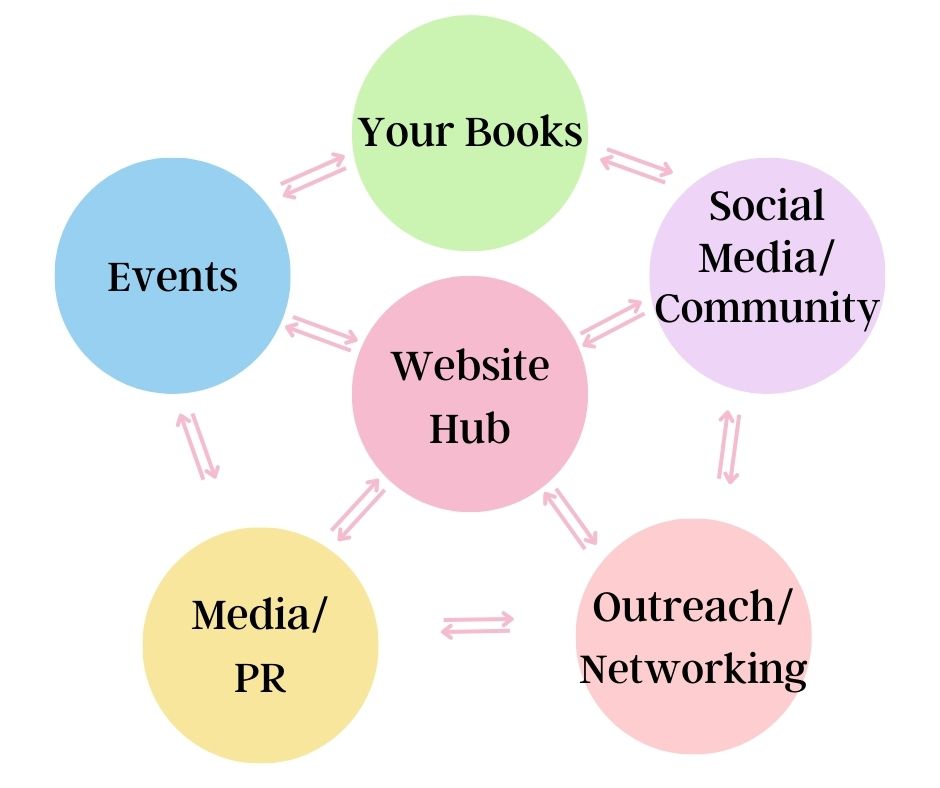
A website is a central hub for your brand and helps you establish credibility as a professional writer. It provides a platform to showcase your work, connect with readers, and build relationships with fans. When a reader (or agent or publisher) searches you on the internet, a website brings them to your hub where they can sign up for your email list, buy books, check out social media, learn where you’ll appear at an event, and more.
I see a website as the center of your writing business, from which all other marketing strategies connect. In the center is your website hub, and spokes radiate out to community (social media), events, publicity, etc.
But there’s more your website can do depending on your goals. Merch, direct sales of books, courses, subscriptions, and more can and should be sold from your website. Yes, you can piecemeal all this, but why send your readers to 5 different places depending on what they want? Make it easy to get everything in one place: Your website.
Why Every Author Needs a Website
Here are the top reasons every author should have a website:
You Own It: Algorithms change, but your website remains yours. No one can suddenly reduce your reach or decide your content is no longer visible.
It Gives Readers One Place to Find Everything: Readers shouldn’t have to hunt for:
- Book lists
- Reading order
- Bonus content
- Newsletter signup
- Social links
- Contact information
Your website serves as a central hub.
It Helps You Build an Email List: Your email list is one of the most valuable assets in your author business. A website allows you to offer a reader magnet and use it to collect email subscribers you can turn into raving fans. Unlike social media followers, you own your email list. Plus, your email goes into the inbox of all your subscribers, whereas a social post is fed to only a small fraction of your followers.
It Makes You Look Professional: Readers, bloggers, podcasters, librarians, bookstores, and event organizers often search for an author’s website. A professional website instantly builds credibility.
It Helps Readers Discover Your Books: Many readers search online for:
- Character names
- Series names
- Book titles
- Tropes
A website can help those readers find you through search engines.
How Your Website Fits Into Author Marketing
I think one reason many authors don’t build a website, besides cost and tech know-how, is the idea that it simply sits there. It’s true that if you build it, people don’t just come.
In fact, I recently wrote a post on how to help readers discover your books, in which I discuss how many marketing tips, including websites and social media, are not ideal for discovery. If that’s the case, then why have it?
Think of it like wanting to host an open house. First, you need a house and stuff that people want to enjoy. But just opening your door doesn’t get people there. You have to go out into the world and invite them to your open house.
Just like in our open house example, to find readers, you need to go out into the world where they hang out and invite them back to your house. In this case, your house is your website.
When a potential reader discovers you through a podcast interview, a guest blog post, a Facebook takeover, a newsletter swap, a conference appearance, a BookFunnel promotion, or a recommendation from another author, they often want to learn more before committing to your books. Your website gives them a place to do that.
Your website allows readers to browse your books, understand your series, sign up for your newsletter, download bonus content, learn more about you, and become part of your community.
This is especially important now when marketing is less about repeatedly shouting “buy my book” and more about building relationships and creating experiences. Readers want to feel connected to authors and immersed in the worlds they create. Your website gives you a place to provide resources that deepen reader engagement.
Every outreach effort you make should ultimately point readers back to a place you own. Social media accounts can disappear. Algorithms can change. Platforms can come and go. But your website remains your digital home. It’s the central hub that supports every other piece of your marketing strategy.
What Authors Need on Their Website
Many authors overcomplicate this. You don’t need a giant website. You need a useful website. Your website should have the following elements:
- Home page: This is the first page readers will see when they visit your site. It should be visually appealing, easy to understand, and provide an overview of you and your books. I’m a HUGE believer in email lists, and I encourage you to have your list sign up front and center on this page.
- About page: This page should include your bio, your writing journey, your personal story, or anything that would attract the reader of your books. The trick here is to make it interesting. Infuse your personality, quirks, and other anecdotes.
- Books page: This page should include information about your books, including summaries, cover images, and purchase links. You should consider a page for each book, or at least a page for each series, with each book on it. Admittedly, I’m terrible at keeping this information up to date on my site. Don’t be like me! This is what your author page is all about…you and your books.
- Contact page: This page should include a form that readers can use to contact you. Don’t put your email, as you’ll make yourself susceptible to spam.
- Social media links: Make sure to include links to your social media accounts so readers can connect with you on other platforms.
- Blog (Optional): A blog can be like social media where you share your writing journey, updates on goings ons, have polls, and a whole lot more. It can offer additional marketing oomph through search engine optimization (SEO) and sharing your blog posts on social media. BUT… only add a blog component if you’re going to blog regularly. Blogs aren’t a requirement.
Additional pages you may need if you offer anything beyond your books:
- Merch: Many website platforms have add-ons or features where you can sell from your site. Or resources such as PayHip, Printify, and others can integrate with your website.
- Courses: Again, depending how you’ve set up your website, you can add features that allow for courses or a membership.
- Special offers: This would include items such as signed books, special editions, book bundles, and more.
- Subscriptions: Many authors have added income streams with subscriptions through which they might serialize their content, offer bonuses and exclusive content, and more.
Even if the above are hosted elsewhere (e.g. your subscription on Patreon or merch on Shopify), you should have a page about it on your website and then links to the source.
Extras Romance Authors Should Add to Their Website
I think sometimes authors are told to “have X,” so they create X, but don’t have a good sense of why they have it or how to use it. It’s important to remember that your website needs to serve a purpose… help readers find you and become fans. Here are a few extra details you can add to help readers:
Tropes: Readers often shop by trope. Include trope lists for each book to help readers identify which books of yours they’ll enjoy most.
Character and World Content: Readers love extra content. This can be given as part of your blog or even in a subscription. Ideas include:
- Character profiles
- Family trees
- Maps
- Bonus scenes
- Deleted scenes
- Holiday extras
Reader Resources: Create a reader hub that includes information such as:
- Reading order
- Frequently asked questions
- Downloadables
- Exclusive content
Link List: Many authors use a service like Linktree for their Instagram or other social media bios, so readers can get more information. But I recommend having this information on your website. First, it’s no more work to add a link to a link page on your website than on LinkTree. Second, you have a website with tons of information; why not send them there? Here’s my link page on JennaHarte.com. If you use WordPress and have the paid version of Elementor, there is a link widget. Here’s an example of that from TenderandTemptingTales.com.
How to Build an Author Website
When building a website, there are five basic steps:
1) Buying a domain name.
Even if you use a host or website builder like Wix or Squarespace, I recommend buying your domain separately to make sure you have full ownership of it (as opposed to having the host buy it on your behalf). I use Godaddy for all my domains, but you have other choices such as Namecheap.
Choose your author or pen name and .com. Since .com is what we think of first, it’s ideal over having another extension, especially if you share a name with someone else. You don’t want to send people to another website because the person didn’t remember you were .info instead of .com.
If your name isn’t available as a .com, consider adding the word “author”. For example, SallySmithAuthor.com or SallySmithRomanceAuthor.com or AuthorSallySmith.com… You get the point. You want to brand your name as a romance author, so you want it in your domain name.
2) Obtaining web hosting or a website builder platform
There are a number of website builders available that make it easy for you to create a website, even if you have no coding experience. Here are a few popular options:
- Wix: Wix offers a lot of flexibility. It’s easy to use and offers a variety of pre-made templates to choose from.
- Squarespace: Squarespace is a popular website builder with many design options. It’s a bit more expensive than Wix, but it’s easy to use and offers many great features.
- System.io: This has a free option and tons of cool bells and whistles, including ecommerce, course setup, blogging, and email list building. The challenge is that it requires a bit of tech know-how to set up and use.
- Hosting and WordPress: I’m a WordPress snob. I’ve been using WordPress (self-hosted) since 2010 and love it. Once you learn it, it’s easy to use. The benefit of WordPress over other options is greater ownership of your website, more customization, and more features. Plus, it’s less expensive than using Wix or Squarespace. JennaHarte.com and WritewithHarte.com are both run on WordPress. To use WordPress, you’ll need a webhost. I love Momwebs, as it’s affordable and the tech support is awesome! All my sites are hosted there.
What about Substack and platforms like it?
Substack has become increasingly popular with authors because it combines a newsletter and website into one easy-to-use platform. It allows you to publish posts, grow an email list, and build a subscriber community without worrying about hosting, plugins, or website maintenance.
However, Substack has limitations as a full author website. Customization options are limited, making it harder to create a unique brand experience. It isn’t ideal for showcasing large backlists, series reading orders, reader resources, media kits, or other content that authors often need as their careers grow. While your email list is portable, you’re still operating within Substack’s ecosystem rather than fully controlling your online presence. For many authors, Substack works best as a companion to a website rather than a replacement for one. It can be a place to nurture reader relationships while using a dedicated website as the central hub for books, resources, and business information.
3) Setting up your domain name to work with your web host
Your website host or builder platform will have instructions on how to do this if you buy the domain outside the host or platform. Basically, you get the nameserver information from your host or platform builder and give it to the domain registrar so it knows where to send visitors to your domain.
4) Installing WordPress or your theme
If you use Wix or Squarespace, you’ll need to select a theme. If you’re going with WordPress, you’ll need to install it (or your host may do it for you) on your site, then choose a theme. In all cases, you’ll be able to find free themes or buy them.
I’ve invested in both Themify.me and Elementor for greater customization, but to start out, you can use a basic theme.
You may also have the option to add additional features. For example, you may want your books to scroll across the top. At JennaHarte.com, I have a static band for my contemporary romance and a scrolling band for my romantic mysteries. You’ll need to check with your platform for free and paid add-ons.
With WordPress, the addons are called plugins, and there are a bajillion of them. If there’s something you want your website to do in the fore- or background, there’s likely a plugin that will do it. For example, you can add Patreon, memberships, and e-commerce to your WordPress site through plugins.
5) Setting up the site
Once the foundation is in, you need to add your content (About page, contact, etc). In most cases, it’s easy to write directly into the platform, much like writing in a Word or Google doc. If you want images, most of these sites let you easily upload and use them in your content without needing to know HTML. Don’t forget to add your email sign-up! Your email service provider will help you create a form script that you can copy and paste into your website.
How to Use Your Website
Many authors build a website and then ignore it or don’t maximize its potential. A website works best when it becomes the hub of your marketing. Here’s how you can best use your website:
Drive Social Media Traffic to It: Instead of constantly sending people to Amazon, send them to your website. There they can:
- Browse all your books
- Join your newsletter
- Learn about upcoming releases
Note that there are times you may want to drive traffic directly to Amazon or a retailer. But for posts that help readers learn about you, sending them to your website is a great way to do so.
Create Content That Lives Longer: An Instagram post disappears quickly, whereas a blog post can continue attracting readers for years. For example:
- Book recommendations
- Character profiles
- Research articles
- Reading guides
- Bonus content
Build Your Email List Consistently: Every page should provide an opportunity to subscribe. I recommend a subscribe opportunity above the fold on your home page, and then in the sidebar on all other pages. Every page a reader checks out should offer them the opportunity to subscribe.
Update It Regularly: You don’t need to update it weekly. But you should add new content as needed to:
- Add new books
- Update events
- Refresh reader magnets
- Check links periodically
Admittedly, I’m not always on top of this. But it’s important to keep your website current. Think of your website as a living asset.
Common Website Mistakes Authors Make
Making It About Themselves Instead of Their Books: While readers do enjoy getting to know authors, first and foremost, readers usually come to a website to learn about books. Make your books easy to find.
Having Too Many Menus: Keep navigation simple. Nest less sought-after information. For example, I have an About menu item and, nested below it (drop-down list), I have links to my Privacy, TOS, and Media Kit pages.
Not Collecting Email Addresses: This is one of the biggest missed opportunities. Once again, have a signup form on the homepage, front and center. I recommend focusing on giving away your reader magnet as the incentive, rather than something like “sign up to receive updates.”
Not Optimizing for Mobile: Many, if not most, visitors will come from their phones or tablets.
Letting Information Become Outdated: Alas, I’m guilty of this sometimes. But nothing looks less professional than an outdated and/or dormant website. One trick is to use an add-on to feed your social posts onto your website. That way, you have new content being added, but you’re not having to write blog posts or constantly update the site.
Need help organizing your author platform or developing your content marketing strategy?
Inside the Write with Harte Library, you’ll find planning tools, marketing resources, and worksheets designed to help romance authors build a sustainable writing career. Join our free community for access to the resource library, weekly Zoom calls, and support from fellow romance writers working toward the same goals. Enter your email below to get access: